Overview
This application is designed to streamline and manage the process of trucks entering and leaving a warehouse. The goal is to improve efficiency, reduce wait times, and provide better visibility into vehicle movement.

My Role
Timeline - 02 Weeks
I was responsible for the end-to-end delivery of this Application, including its user experience, which I designed from scratch.
I partnered with the business team to translate their pain points into solutions that enhanced the overall user experience.
Impact created
5 Organisation were using initially this application at their warehouse to manage dispatch.
250+ Dispatches marked successfully using Gate Pass App by each organizations weekly.
100% vehicles logged with digital trail.
40% Faster average gate In/Out.

Problem Statement
The current manual process lacks real-time tracking and is inefficient, causing delays in loading and unloading.Reduce manual errors and delays by validating vehicle entries
Key Problems to solve
Digitise and streamline the vehicle Gate In and Gate Out process
Reduce manual errors and delays by validating vehicle entries
Quickly verify, record, and manage vehicle movements
Introduce a fallback workflow for handling unregistered or unscheduled vehicles.
Ensure faster decision-making and reduced congestion at the gate through automation and visibility.

User Research
We have visited warehouses in the Delhi-NCR region and interviewed users to understand their current processes and challenges, gathered insights into how vehicles are marked, how drivers are identified, and what steps are taken for approvals. Conducted user interview to facilitate a deeper understanding of user behaviour.
Some of the questions we have asked
Walkus through the currently vehicle Gate In / Gate Out process?
How do you handle vehicles that don’t have the required documents?
What frustrates you the most about the current system?
“I need to call everytime inventory manager to ask about the current inventory for production.”
Key Insights
Guards struggle with document cross-checking (PO/SO matching vehicle) manually.
Some warehouses have separate Gate-In and Gate-Out points.
There’s no instant way to notify managers if a vehicle isn’t registered.
Entry delays cause traffic congestion inside warehouse lanes.
Entry delays cause traffic congestion inside warehouse lanes.
Ideate the Solutions
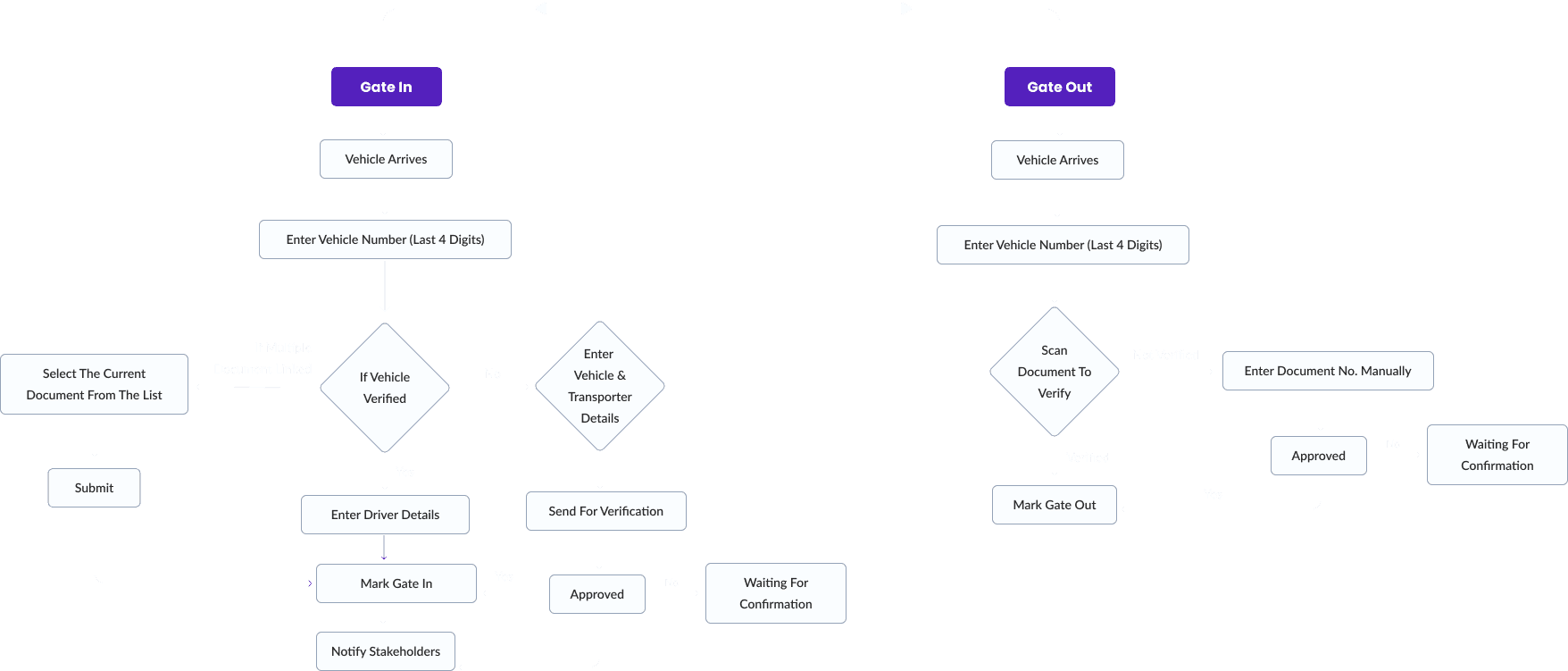
Based on our research and insights, we created multiple user journey for multiple user like Security Guard, Dispatch Manager, warehouse Manager and all. Where they can manage easily all the process through this application.
User Journey for Gate In/Gate Out
Final Solution Designed
Key feature
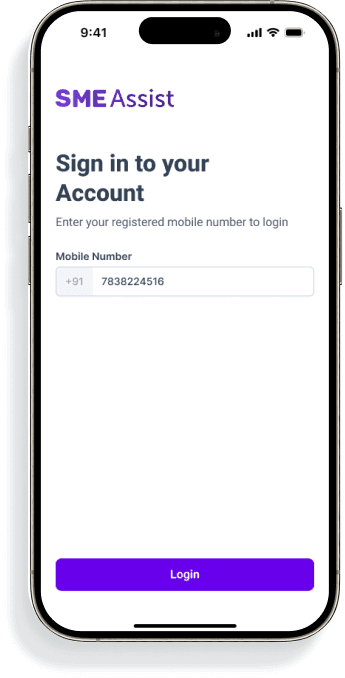
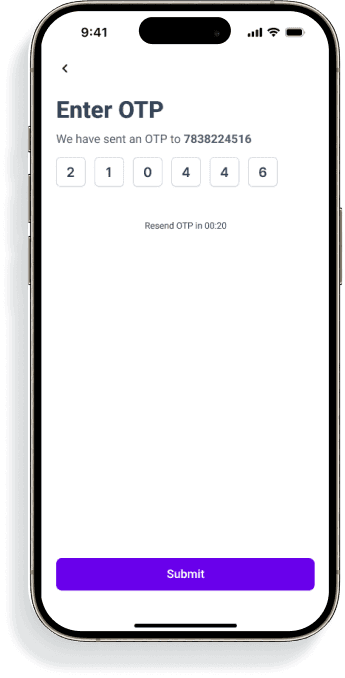
Quick Login - Security Guard will be login with their registered mobile Number with OTP Verification.
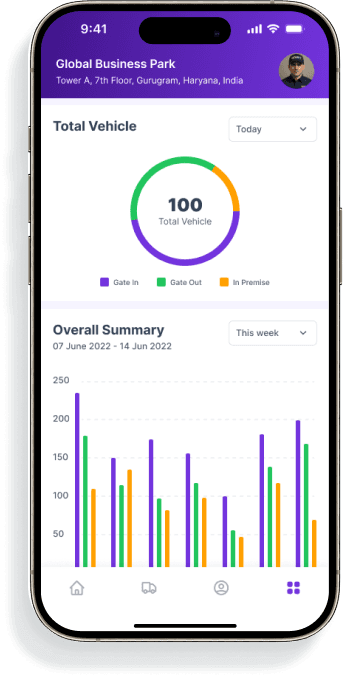
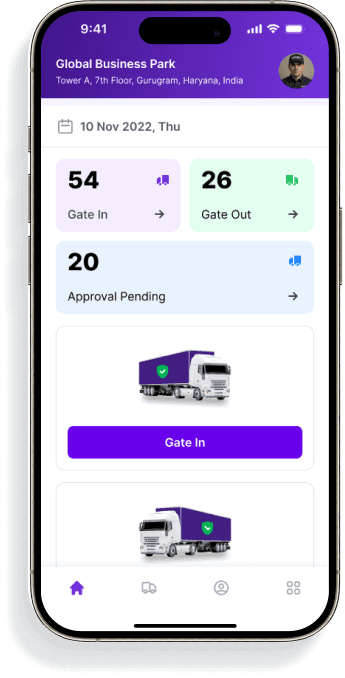
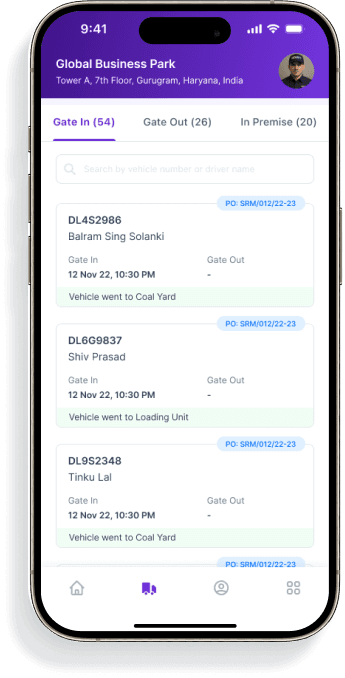
Landing Screen - User can get a Quick insight into the warehouse status, like how many vehicles are under premises or left and pending for dispatch.
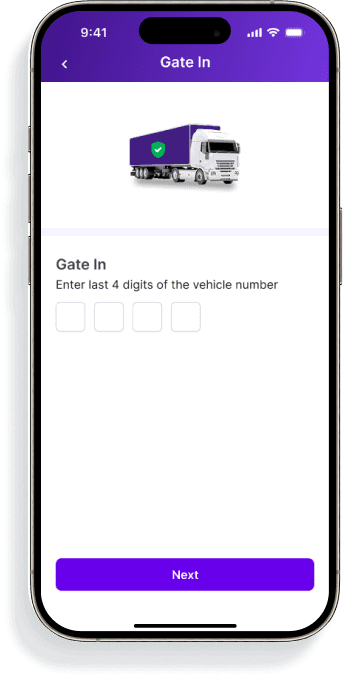
Prominent CTA - Security guard can mark Gate In or Gate Out, clicking on the prominent CTA via document verification as required for completion of that particular task.
Quick Navigation Bar - Quick & easy navigation to see other details.
Key feature
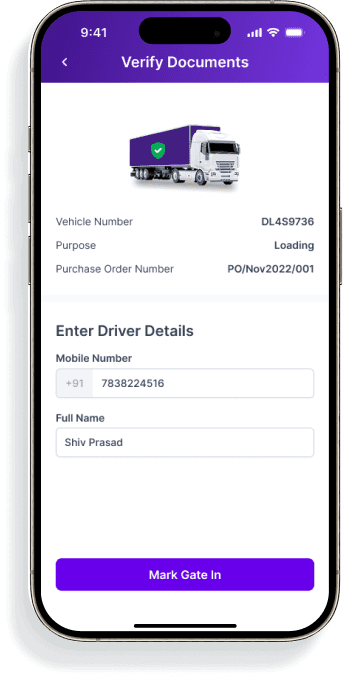
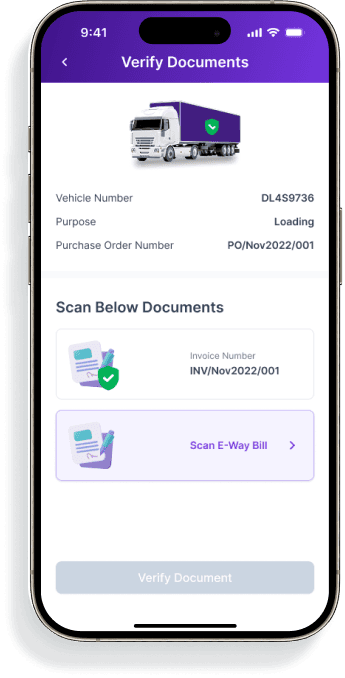
Vehicle Details & Verify Document - Security Guard can see the complete vehicle details along with the purchase order linked with the vehicle and the purpose vehicle to come at warehouse.. Once the Vehicle verified gate in will be completed.
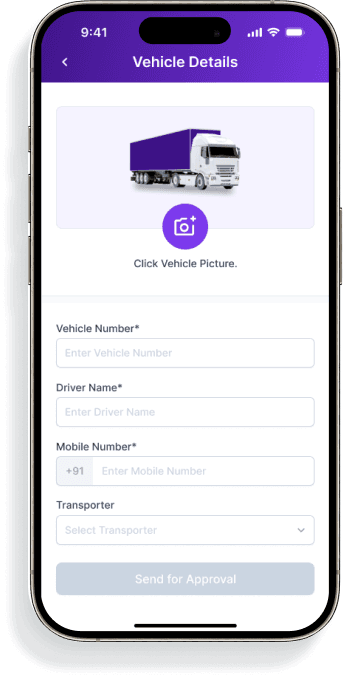
Verification Details - The Security Guard will enter the driver details of the vehicle. The security guard will enter these details only if they are not filled in during the purchase order creation process.
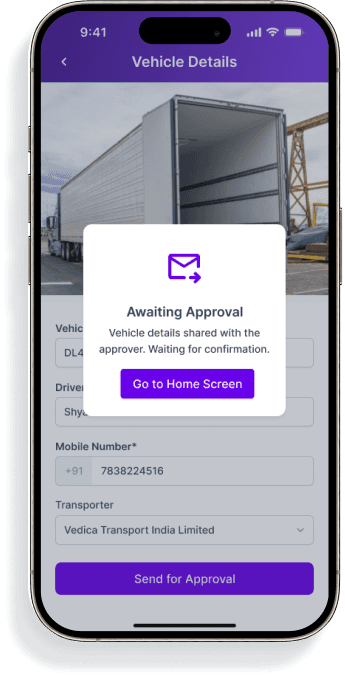
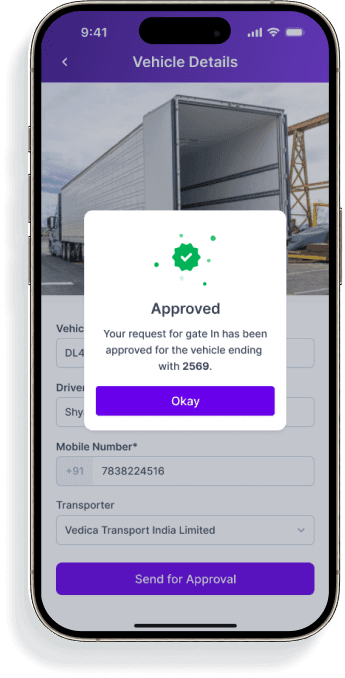
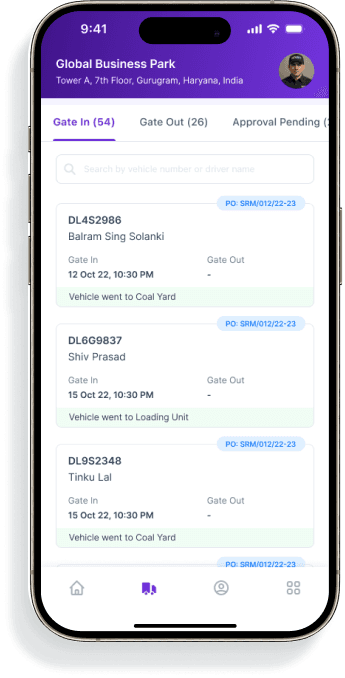
Approval Flow - There are few cases we also catered to, even if vehicles are not registered. Those vehicles can be registered by manually entering the vehicle & driver details and sent for approval by the dispatch manager.
Key feature
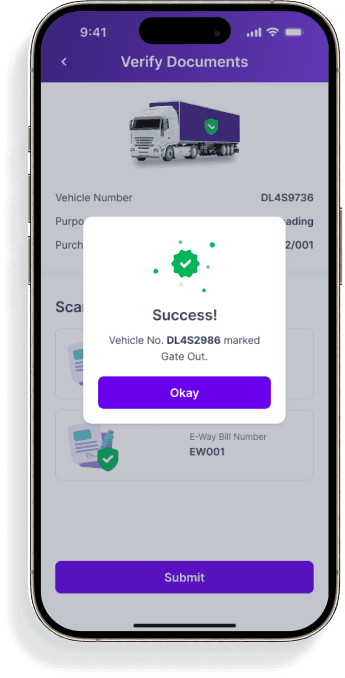
Alert & Notification - The system send an alert message for success or failed attempts.
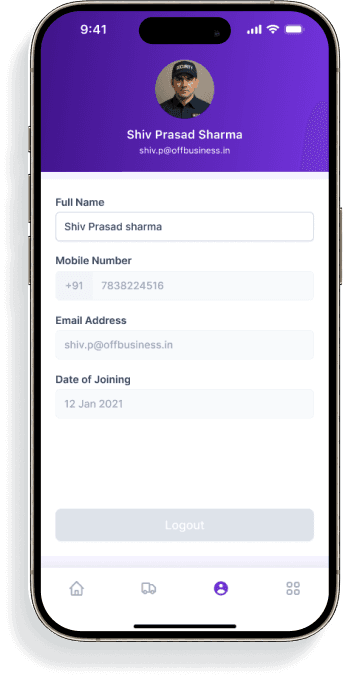
User Details - Separate User details for each security guards.
Key feature
Dashboard - The User can get quick insight about pending vehicle or numbers of vehicles Gate In/ Out from the warehouse.
Document Verification - Multiple document verification for gate out to reduce risks & penalty.
Quick Navigation Tab - User can easily navigate to the other tabs to see other details.
Initially, we have made this app particularly to Security guards only. Additionally, on V2, we have added the complete tracking status of the Vehicle from gate in to gate out. User can track the timing of each process which has been taken to complete the task,
Overview
This application is designed to streamline and manage the process of trucks entering and leaving a warehouse. The goal is to improve efficiency, reduce wait times, and provide better visibility into vehicle movement.
My Role
I was responsible for the end-to-end delivery of this Application, including its user experience.
Partnered with the business team to translate their pain points into solutions that enhanced the overall user experience.
Timeline - 02 Weeks
Impact created
5 organisations initially applied this application at their warehouse to manage dispatch.
250+ Dispatches marked successfully using Gate Pass App by each organisation weekly.
100% vehicles logged with a digital trail.
40% Faster average gate In/Out.
Problem Statement
The current manual process lacks real-time tracking and is inefficient, causing delays in loading and unloading. Reduce manual errors and delays by validating vehicle entries.
Key Problems to solve
Digitise and streamline the vehicle Gate In and Gate Out process.
Reduce manual errors and delays by validating vehicle entries.
Quickly verify, record, and manage vehicle movements.
Introduce a fallback workflow for handling unregistered or unscheduled vehicles.
Ensure faster decision-making and reduced congestion at the gate through automation and visibility.
User Research
We have visited warehouses in the Delhi-NCR region and interviewed users to understand their current processes and challenges, gathered insights into how vehicles are marked, how drivers are identified, and what steps are taken for approvals. Conducted a user interview to facilitate a deeper understanding of user behaviour.
Some of the questions we have asked
Walk-us through the currently vehicle Gate In / Gate Out process?
How do you handle vehicles that don’t have the required documents?
What frustrates you the most about the current system?
“I need to call everytime inventory manager to ask about the current inventory for production.”
Key Insights
Guards struggle with document cross-checking (PO/SO matching vehicle) manually.
Some warehouses have separate Gate-In and Gate-Out points.
There’s no instant way to notify managers if a vehicle isn’t registered.
Entry delays cause traffic congestion inside warehouse lanes.
Entry delays cause traffic congestion inside warehouse lanes.

Ideate the Solutions
On the Next step, we created user journeys for the Security Guard on how vehicles will enter or exit the Gate. Planned the necessary documents required for Gate In/Out.
User Journey for Gate In/Gate Out
Final Design
Key feature
Quick Login - Security Guard will be login with their registered mobile Number with OTP Verification.
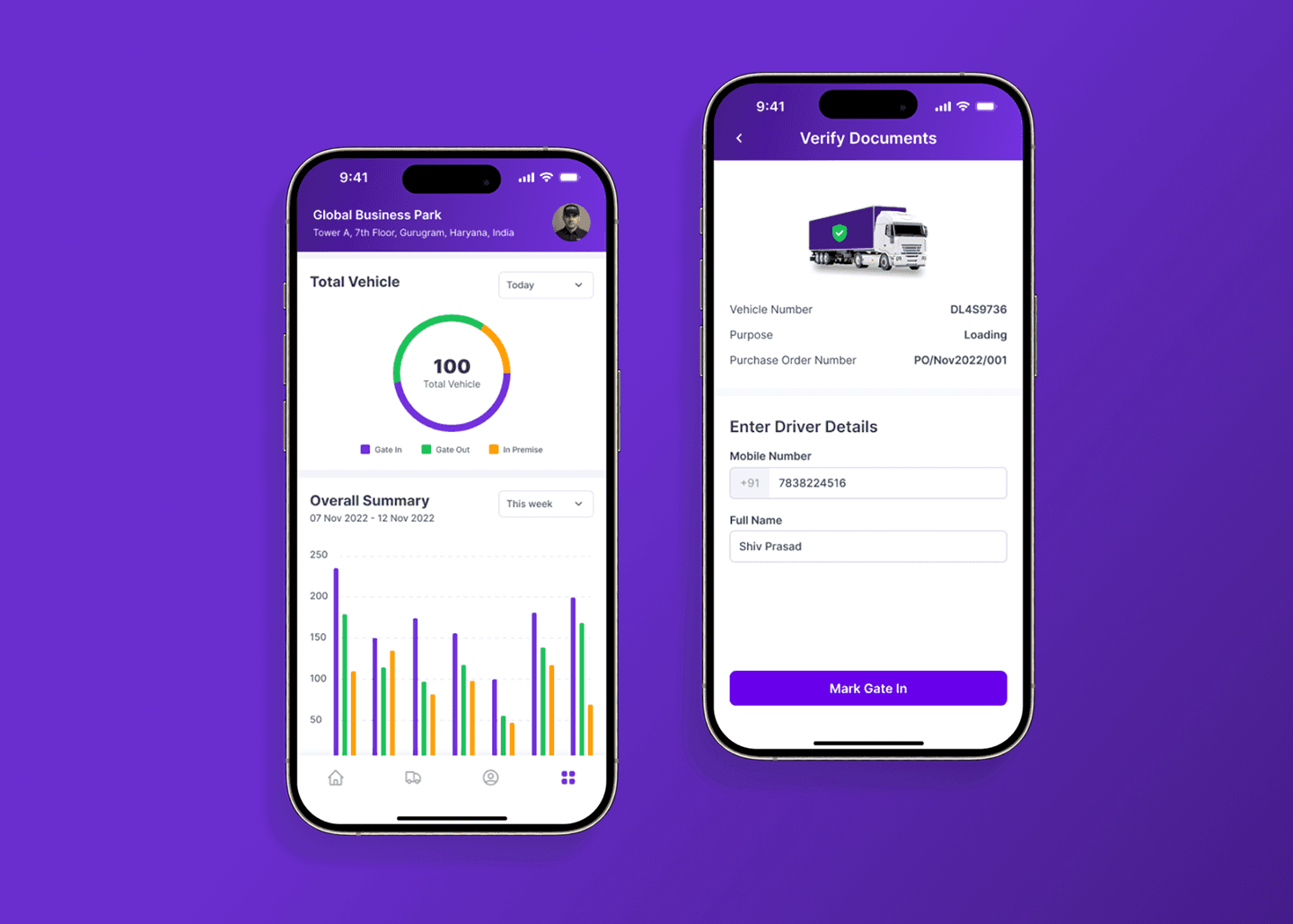
Landing Screen - User can get a Quick insight into the warehouse status, like how many vehicles are under premises or left and pending for dispatch.
Prominent CTA - Security guard can mark Gate In or Gate Out, clicking on the prominent CTA via document verification as required for completion of that particular task.
Quick Navigation Bar - Quick & easy navigation to see other details.
Key feature
Vehicle Details & Verify Document - Security Guard can see the complete vehicle details, along with the purchase order linked with the vehicle and the purpose of the vehicle to come to the warehouse. Once the Vehicle verification gate is completed.
Verification Details - The Security Guard will enter the driver's details of the vehicle. The security guard will enter these details only if they are not filled in during the purchase order creation process.
Approval Flow - There are few cases we also catered to, even if vehicles are not registered. Those vehicles can be registered by manually entering the vehicle & driver details and sent for approval by the dispatch manager.
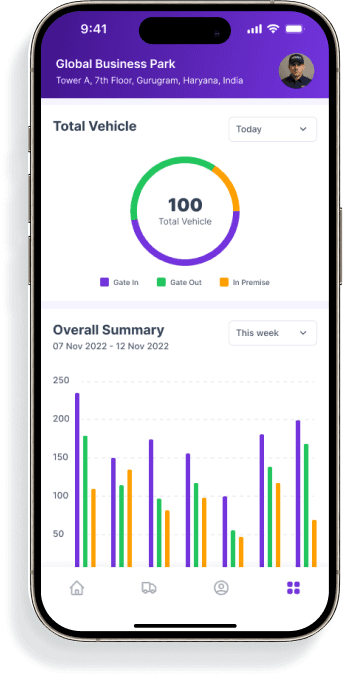
Key feature
Dashboard - The User can get quick insight about pending vehicles or the number of vehicles Gate In/ Out from the warehouse.
Document Verification - Multiple document verification for gate out to reduce risks & penalty
Quick Navigation Tab - User can easily navigate to the other tabs to see other details.
Initially, we have made this app particularly for Security guards only. In addition, on V2, we have added the complete tracking status of the Vehicle from the gate in to the gate out. The user can track the timing of each process which has been taken to complete the task,
Let's Connect
Available for work
Feel free to reach out for collaborations or just a friendly hello
+91 7838 2245 16
Let's Connect
Available for work
Feel free to reach out for collaborations or just a friendly hello
+91 7838 2245 16